
Effective collections management is critical for healthy cash flow. Many businesses on NetSuite...
Unlike fine wine, most inventory does not get better with age. It gets costlier. Without a clear view of how long products have been sitting in the warehouse, businesses risk overstocking, stockouts and capital tied up in goods that no longer sell. An inventory aging report gives you that view.
This guide explains what an inventory aging report is, why it matters, how to read the aging buckets, how to build one in NetSuite and how to act on it. If you want a report built around your items and locations, our NetSuite business intelligence team can help.
In this guide:
Key Takeaways: Inventory Aging Reports
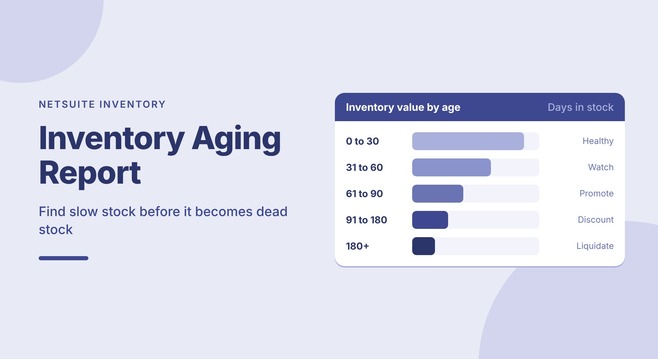
- An inventory aging report groups stock by how long it has been on hand, such as 0 to 30, 31 to 60, 61 to 90 and 90+ days.
- Aging inventory ties up cash, adds storage cost and risks becoming obsolete.
- The report shows what to move, discount, bundle, return or liquidate, and what to stop reordering.
- In NetSuite, aging is usually built from receipt dates with a saved search, SuiteQL or a custom report.
- Review it on a regular cadence and tie each bucket to a clear action.
What Is an Inventory Aging Report?
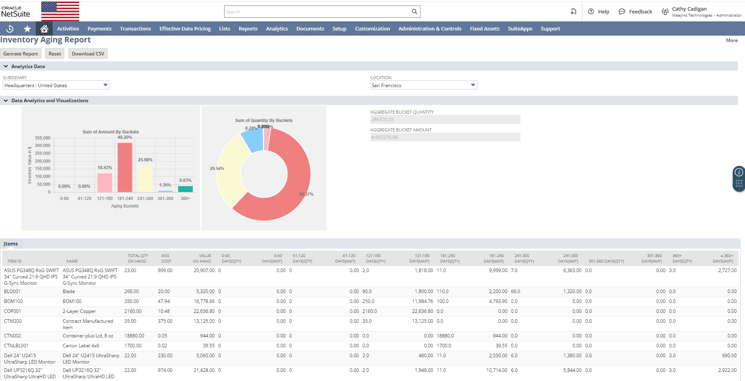
An inventory aging report categorizes inventory by how long each item, or each receipt of an item, has been in stock. It shows quantity and value in aging buckets, so you can see at a glance how much of your inventory is fresh and how much is going stale.
That view lets you decide when to move, discount or liquidate stagnant items, and when to change what you buy.

Reading the Aging Buckets
Most businesses use 30-day buckets, adjusted for how fast their products normally turn. A typical setup, and the action each bucket calls for:
| Bucket | What it usually means | Typical action |
|---|---|---|
| 0 to 30 days | Fresh stock, moving normally | No action needed |
| 31 to 60 days | Slowing down | Watch demand, review reorder points |
| 61 to 90 days | Slow-moving | Promote, bundle or transfer to a location where it sells |
| 90+ days | At risk of becoming obsolete | Discount, return to supplier, liquidate, or review for a write-down |
Fast-moving consumer goods may need 15-day buckets, while spare parts or raw materials may use 90 or 180-day buckets. Pick buckets that match your business, then keep them consistent so trends are comparable month to month.
Why Is It Important?
Aging inventory quietly drains resources. Here is how the report changes stock management:
Improved Cash Flow
Inventory that sits too long ties up capital and adds storage cost. The aging report highlights slow-moving items so you can act, through discounts or promotions, to free up cash and reduce waste.
Optimized Stock Replenishment
The report shows how stock actually moves. You can match purchasing to real demand, avoiding overstock on slow sellers and stockouts on fast movers.
Less Obsolete Stock
Products that linger risk becoming outdated, expired or unsellable. Aging reports help you act in time: mark down, bundle or return to the supplier.
Better Strategic Decisions
If a product sits unsold for 90+ days, it is time to rethink it. Aging data supports decisions on pricing, marketing, product lines and supplier terms.
More Efficient Operations
Prioritize fast-moving items and spend less time and space on low-velocity inventory. Better turnover and fewer dead items make the warehouse leaner.
Building an Inventory Aging Report in NetSuite
To age inventory, you need to know when each unit on hand was received. In NetSuite, that usually means working from receipt transactions rather than only the current on-hand quantity. Common approaches:
- Saved search: Use item receipts and inventory adjustments with formula fields that calculate days since the receipt date and assign a bucket.
- SuiteQL or a workbook: Query transaction lines and inventory detail for more control over the logic and better performance on large item lists.
- Lot and serial numbers: For tracked items, age each lot or serial from its receipt or expiration date, which is more precise.
- Custom report or Suitelet: For high volumes, or when you need FIFO-style aging by location, a custom solution avoids search timeouts and gives a cleaner layout.
Whichever you choose, decide up front whether to age by quantity, by value or both, and whether to report by item, location or subsidiary.
No reliable aging report in NetSuite yet? We build inventory aging reports and dashboards that fit your items, locations and buckets. Talk to our team
How to Use the Report Effectively
A report is only as useful as the actions it drives:
- Monitor regularly: Make it part of your monthly or weekly stock review and track how each bucket changes over time.
- Assign owners: Give each aged bucket an owner and a deadline for action.
- Align sales and marketing: Use aging data to drive promotions, campaigns or bundles that move aging stock.
- Feed it back into purchasing: Lower reorder points or pause buying for items that keep appearing in the older buckets.
- Automate in NetSuite: Use dashboards, scheduled emails and alerts when inventory crosses an aging threshold.

Idle Inventory Is a Liability, Not a Collectible
Some assets gain value with time: vintage wine, aged whiskey, classic cars and fine art. Inventory is not one of them. Fine wine appreciates with age; inventory depreciates.
Used well, an aging report is more than a snapshot. It helps you:
- Boost profitability
- Respond faster to demand changes
- Reduce overhead
- Free up capital
How Maayins Can Help
We help companies get more from NetSuite, including custom inventory aging reports and dashboards, automated alerts and actionable reports built around your business. Whether you manage consumer goods, raw materials or finished goods, we can help you take control of aging inventory and act faster.
Prefer working in a spreadsheet? NetXcel brings live NetSuite saved searches and SuiteQL results into Excel and Google Sheets, so your aging analysis stays current.
Frequently Asked Questions
What is an inventory aging report?
It groups inventory by how long it has been in stock, usually in 30-day buckets, showing the quantity and value in each bucket.
What aging buckets should I use?
Most businesses use 0 to 30, 31 to 60, 61 to 90 and 90+ days. Fast-moving goods may need shorter buckets and slow-moving parts longer ones.
Does NetSuite have an inventory aging report?
Many companies build aging in NetSuite with a saved search, SuiteQL or a custom report based on receipt dates, because they need buckets, locations and valuation that match how they work.
How often should I review inventory aging?
At least monthly, and weekly for fast-moving or perishable products.
What should I do with inventory over 90 days old?
Review it for discounting, bundling, transfers, supplier returns or liquidation, and check whether it needs a write-down under your accounting policy.
Can I see inventory aging in Excel?
Yes. NetXcel pulls live NetSuite saved searches and SuiteQL results into Excel or Google Sheets, so you can analyze aging without manual exports.
Let's Talk Inventory Strategy
Do not let inventory sit on the shelf hoping it turns into something more valuable. Our business intelligence and custom development teams can implement an inventory aging solution built around your operations.