
Most problems teams hit with NetSuite Fixed Assets Management (FAM) trace back to setup: an account that was never flagged for FAM, an asset type with the wrong default life, or a preference nobody reviewed. Those mistakes are cheap to fix before go-live and expensive after hundreds of assets have depreciated.
This guide walks through every FAM setup area in the order you should configure it, explains what each setting actually does, and gives recommended choices for most companies. It is Part 2 of our 12-part NetSuite Fixed Assets series; if you are new to the concepts, start with NetSuite Fixed Assets 101. If you would rather have experts configure it, our NetSuite implementation team can help.
In this guide:
- Key takeaways
- What is the FAM setup checklist?
- How do you set up the chart of accounts?
- How do you create asset types?
- When do you need asset transfer accounts?
- Which FAM preferences matter most?
- How do you give roles FAM access?
- Why do you need a fixed asset sale item?
- What does FAM Diagnostics check?
- FAQ
Key Takeaways: NetSuite FAM Setup
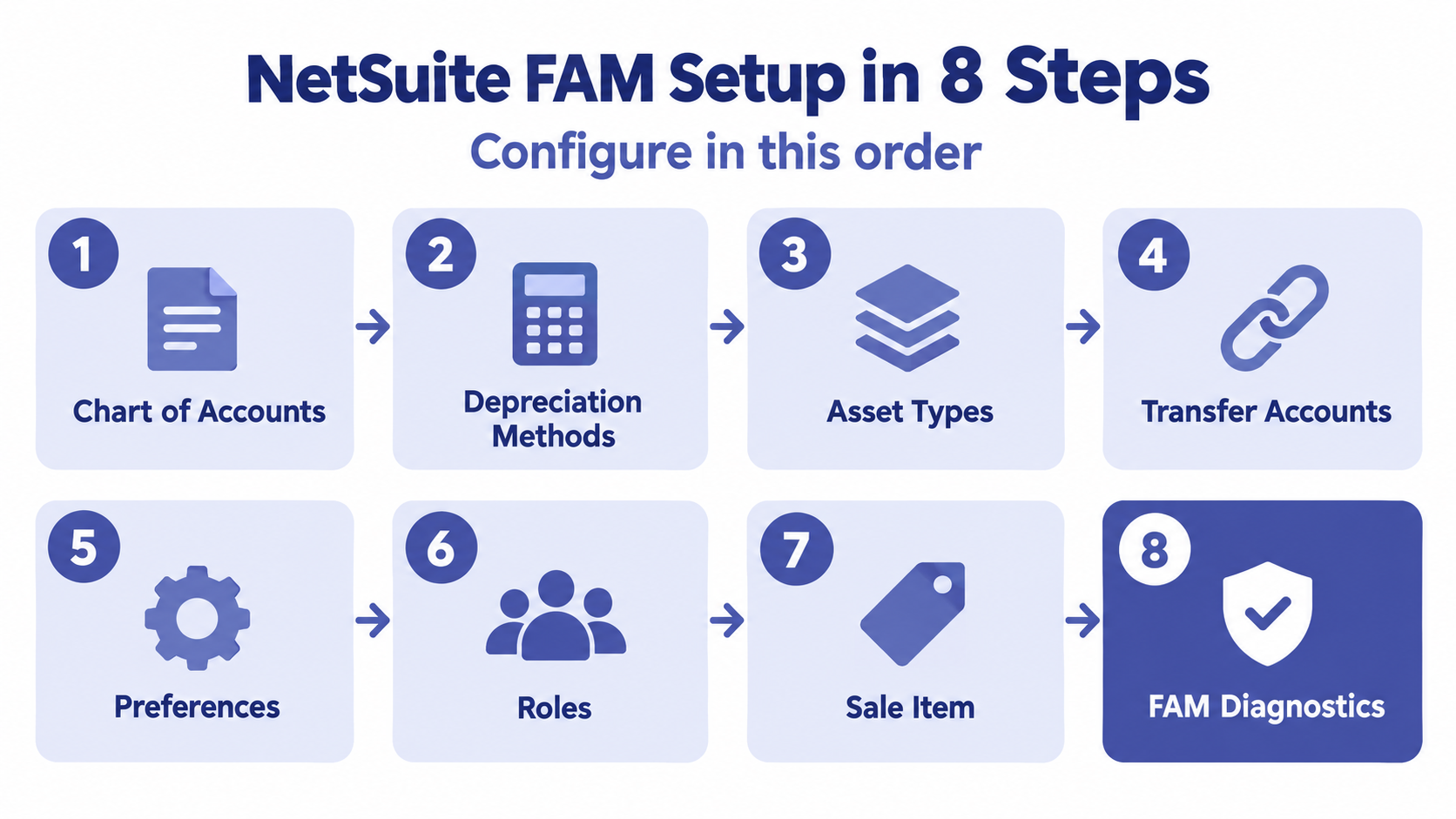
- Configure FAM in order: GL accounts, depreciation methods, asset types, transfer accounts, preferences, roles, sale item and Diagnostics.
- Only accounts flagged with Show in Fixed Assets Management appear on FAM records, and any transaction on a flagged asset account can become an asset proposal.
- Assets copy their accounts from the asset type when they are created, so get asset types right before you load assets.
- Turn off server scripts on CSV import and future-dated depreciation in most setups.
- Schedule FAM Diagnostics scans so missing records are caught before month end, not during it.
What Is the FAM Setup Checklist?
Each setup area depends on the one before it, so the order matters.
| # | Area | Where in NetSuite |
|---|---|---|
| 1 | GL accounts flagged for FAM | Setup > Accounting > Chart of Accounts |
| 2 | Depreciation methods | Fixed Assets > Setup > Depreciation Methods |
| 3 | Asset types | Fixed Assets > Setup > Asset Types > New |
| 4 | Asset transfer accounts (multi-subsidiary) | Fixed Assets > Setup > Asset Transfer Accounts > New |
| 5 | FAM preferences | Fixed Assets > Setup > System Setup |
| 6 | Role permissions | Setup > Users/Roles > Manage Roles |
| 7 | Fixed asset sale item | Lists > Accounting > Items > New |
| 8 | FAM Diagnostics portlet | Home > Personalize > SuiteApps |
Depreciation methods have their own guide (Part 3 of this series). This post covers the rest.
How Do You Set Up the Chart of Accounts?
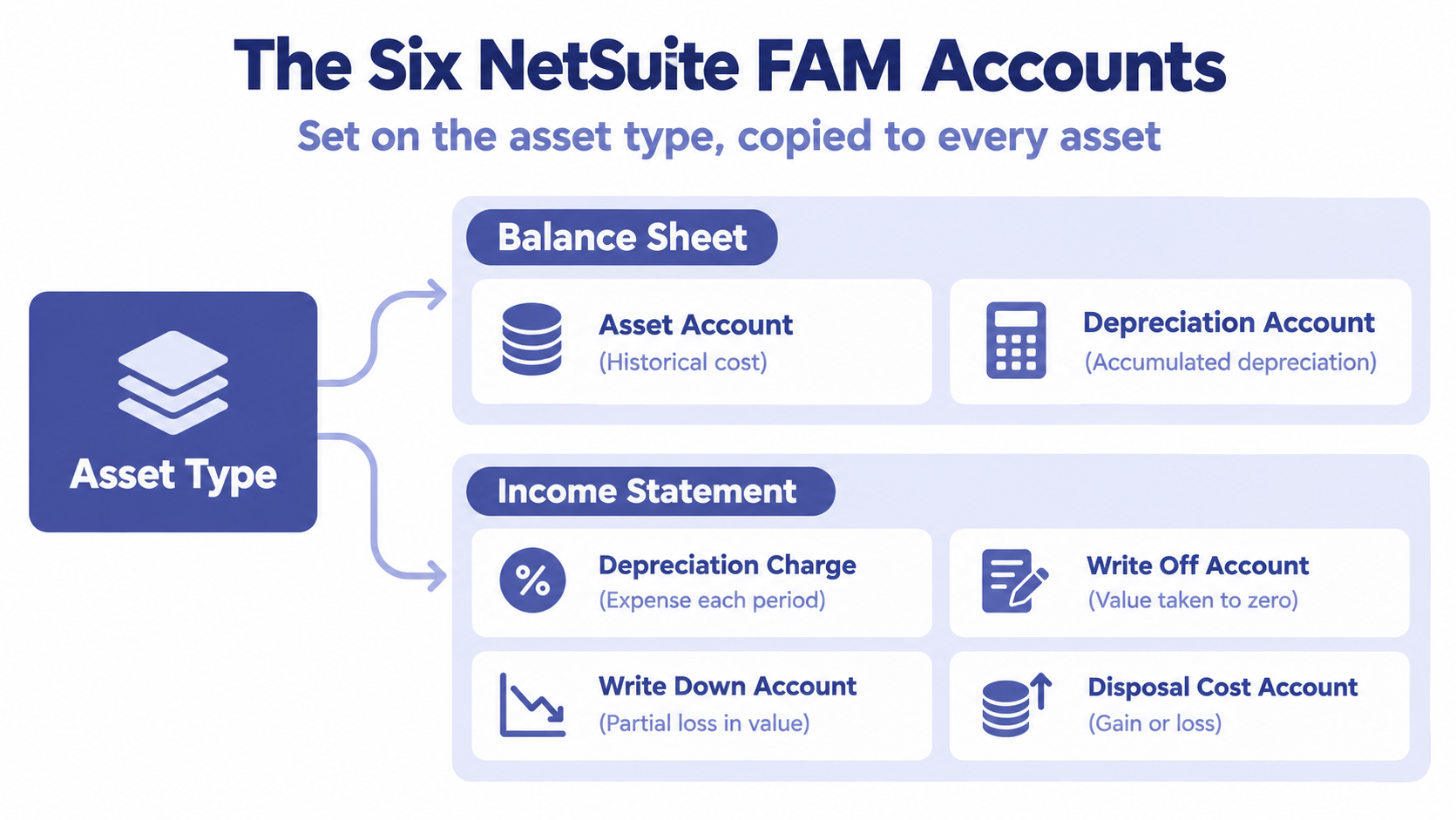
FAM adds account fields to the Asset Type, Asset Proposal and Asset records. Each field tells FAM which GL account to post to for a given purpose. An account only appears in those fields if it is flagged with Show in Fixed Assets Management on the account record.
| FAM account | What it holds | Statement | Allowed account types |
|---|---|---|---|
| Asset Account | Historical cost of assets | Balance sheet | Fixed Asset |
| Depreciation Account | Accumulated depreciation (contra asset) | Balance sheet | Fixed Asset |
| Depreciation Charge Account | Depreciation expense each period | Income statement | Deferred Expense, Expense, Other Expense |
| Write Off Account | Value written off entirely (residual taken to zero) | Income statement | Fixed Asset, Deferred Expense, Expense, Other Expense |
| Write Down Account | Value reduced partially, for example after impairment | Income statement | Fixed Asset, Deferred Expense, Expense, Other Expense |
| Disposal Cost Account | Gain or loss on sale, scrap or retirement | Income statement | Expense, Income, Other Expense, Other Income |
To set them up, edit existing accounts or create new ones under Setup > Accounting > Chart of Accounts, then use Show in Fixed Assets Management to choose one or more FAM purposes for each.
How Granular Should the Accounts Be?
A practical pattern is one asset account and one accumulated depreciation account per major asset class (Machinery and Equipment, Computer Equipment, Furniture and Fixtures, Vehicles, Leasehold Improvements), with shared accounts for depreciation expense, write-downs and disposal gain or loss. This keeps the balance sheet readable and lets you reconcile each class to its own GL account. If your financial statements already show PP&E by class, mirror those classes.
One important side effect: any transaction that posts to an account flagged as a fixed asset account becomes a candidate for an asset proposal. Flag only the accounts that should create assets.
How Do You Create Asset Types?
An asset type is a category such as IT Equipment, Machinery, Furniture and Fixtures, Vehicles or Leasehold Improvements. Every asset must have one, and each new asset pulls its defaults from it. A well-designed asset type means users rarely have to change anything on an individual asset.
Create one at Fixed Assets > Setup > Asset Types > New (if Fixed Assets is not in your menu, look under More).
Header Fields
- Name and Description
- Accounting Method: the default depreciation method for this type.
- Residual Percentage: the default salvage value as a percentage of cost.
- Asset Lifetime: the default useful life in depreciation periods (months for monthly depreciation).
- Operating Lease: check this only for asset types used for operating leases.
General Subtab
- Depreciation Active: whether assets of this type depreciate. Clear it for land or assets not yet in service.
- Revision Rules: Remaining Life spreads a change in value over the remaining life (prospective). Current Period recalculates to date and posts the difference now (retrospective).
- Depreciation Rules: when depreciation starts: Acquisition, Disposal, Mid-Month or Pro-Rata.
- Depreciation Period, Financial Year Start, default Custodian, Supplier and Disposal Item.
Accounts Subtab
Assign the Asset, Depreciation, Depreciation Charge, Write Off, Write Down and Disposal Cost accounts. For example, a Machinery and Equipment type might use Machinery and Equipment, A/D Machinery and Equipment, Depreciation Expense Machinery and Equipment and Gain (Loss) on Sale of Assets. Save, and the type appears in the FAM Asset Type List.
Important: an asset copies its accounts from the asset type when the asset is created. Changing accounts on the asset type later does not update existing assets. Get the accounts right before you load or generate assets.
When Do You Need Asset Transfer Accounts?
If assets ever move between subsidiaries, for example a US company sending equipment to a new Canadian subsidiary, FAM needs to know which GL accounts hold the intercompany balance during the move.
- Identify or create an origin and a destination transfer account. Many companies use an existing Intercompany Clearing account for both.
- Go to Fixed Assets > Setup > Asset Transfer Accounts > New.
- Create one record for each subsidiary pair, setting Origin Subsidiary, Destination Subsidiary, Origin Transfer Account and Destination Transfer Account.
Without these records, cross-subsidiary transfers fail. Part 10 of this series covers the journals FAM posts when a transfer runs.
Setting up FAM for the first time? Our free Fixed Assets Health Check reviews your accounts, asset types and preferences before you go live. Book your health check
Which FAM Preferences Matter Most?
Go to Fixed Assets > Setup > System Setup. Most options sit on the General subtab. These settings change how every asset behaves, so review them with your implementation partner and record the decisions.
Precompute Depreciation Values
This button builds depreciation forecasts on demand. Forecasting also runs automatically when an asset is created from a proposal, and weekly (Sundays by default) for assets that were imported or entered manually. Run it yourself after any bulk import.
Asset
- Run Server Scripts on CSV Import: leave this off in most cases. With it on, scripts can recalculate and overwrite the values in your import file.
- Allow Asset Value Editing: controls whether users can edit cost and value fields directly. Asset Revaluation is the recommended way to change values, so keep this off or limited to a few roles.
- Allow Negative Asset Cost: whether assets can carry a negative cost.
Proposal and Creation
| Setting | Effect | Recommendation |
|---|---|---|
| Restrict Ability to Reject Proposals | Only administrators can reject proposals | Turn on for a controlled review |
| Propose Approved Transactions Only | Proposals only from approved transactions | Turn on if you use bill or journal approvals |
| Use Lease Term as Asset Life | Leased assets use the lease term as their life | Turn on if you use Lease Accounting |
Depreciation
- Summarise Journals By: Asset Type, Sub-Category or Parent Asset. Fewer, summarized journals are easier to review; more detail is easier to trace.
- Allow Future-Dated Depreciation: leave it off so assets only depreciate up to the current period.
- Use Accounting Period Dates for Depreciation: turn on only if your periods are not calendar months, for example a 4-4-5 calendar.
- Use Custom Journals: only if you use a custom journal entry form for FAM.
Transfer
Post on Location Change, Post on Class Change and Post on Department Change decide whether moving an asset between these segments posts journal entries. With them on, FAM reclassifies cost and accumulated depreciation to the new segment.
Disposal
- Write-Down Using Depreciation Account: on, write-downs post to accumulated depreciation and original cost is preserved; off, they reduce the asset account directly. Agree the presentation with your auditors.
- Asset Disposal Invoice Form: the invoice form used when an asset is sold. Leave blank to use your default form.
Lease
Allow Lease Modifications lets selected roles change Lease records in Asset Created status. Changing the lease does not change the asset record itself.
How Do You Give Roles FAM Access?
FAM ships with a custom role called Fixed Assets Management that has every permission FAM needs. Use it as the reference rather than guessing.
- Go to Setup > Users/Roles > Show Role Differences.
- Set Base Role to Fixed Assets Management, choose the roles to compare, keep Only Show Differences checked and click Show.
- Most FAM permissions are in the Custom Record category: FAM Asset, FAM Asset Type, FAM Depreciation History, FAM Process and others.
- Edit the role under Setup > Users/Roles > Manage Roles and add what is missing, such as Fixed Asset Depreciation Entry, Fixed Asset Disposal Entry and Fixed Asset Transfer Entry on the Transactions subtab.
Users get new permissions the next time they log in to the role. Keep segregation of duties in mind: the person who approves vendor bills should not also be the only person generating assets and running disposals.
Why Do You Need a Fixed Asset Sale Item?
When an asset is sold, FAM creates a customer invoice, and an invoice needs an item. You do not need one item per asset.
- Go to Lists > Accounting > Items > New.
- Choose Non-inventory Item for Sale (Non-inventory Item for Resale also works).
- Use a generic name such as Fixed Asset Sale and set the subsidiary.
- On the Accounting subtab, set the Income Account to your gain or loss on sale of assets account, not a revenue account.
- Set the tax schedule and save.
The item must be available in the same subsidiary as the assets you sell. For buyers who are not customers in NetSuite, create one generic customer record available to all subsidiaries.
What Does FAM Diagnostics Check?
FAM Diagnostics is a health check for your fixed asset data. Add it from your Home dashboard: Personalize > SuiteApps > FAM Diagnostics. It is available to Administrator and Fixed Assets Manager roles by default; other roles need the FAM Recent Diagnosis permission.
| Check | What it finds or fixes |
|---|---|
| Precompute Depreciation Values | Builds missing depreciation schedules for manual and imported assets |
| Reset Asset Values | Clears outdated forecasts after changes to life or cost |
| Check Missing Summaries | Finds missing background summary records, without which depreciation cannot run |
| Check Missing Asset Values Record | Finds assets with no Asset Values record, so no depreciation can be calculated |
| Check Missing Lease Contracts | Finds lease payments imported without contracts |
| Check DHRs Without Associated Records | Finds orphaned depreciation history records that disrupt depreciation |
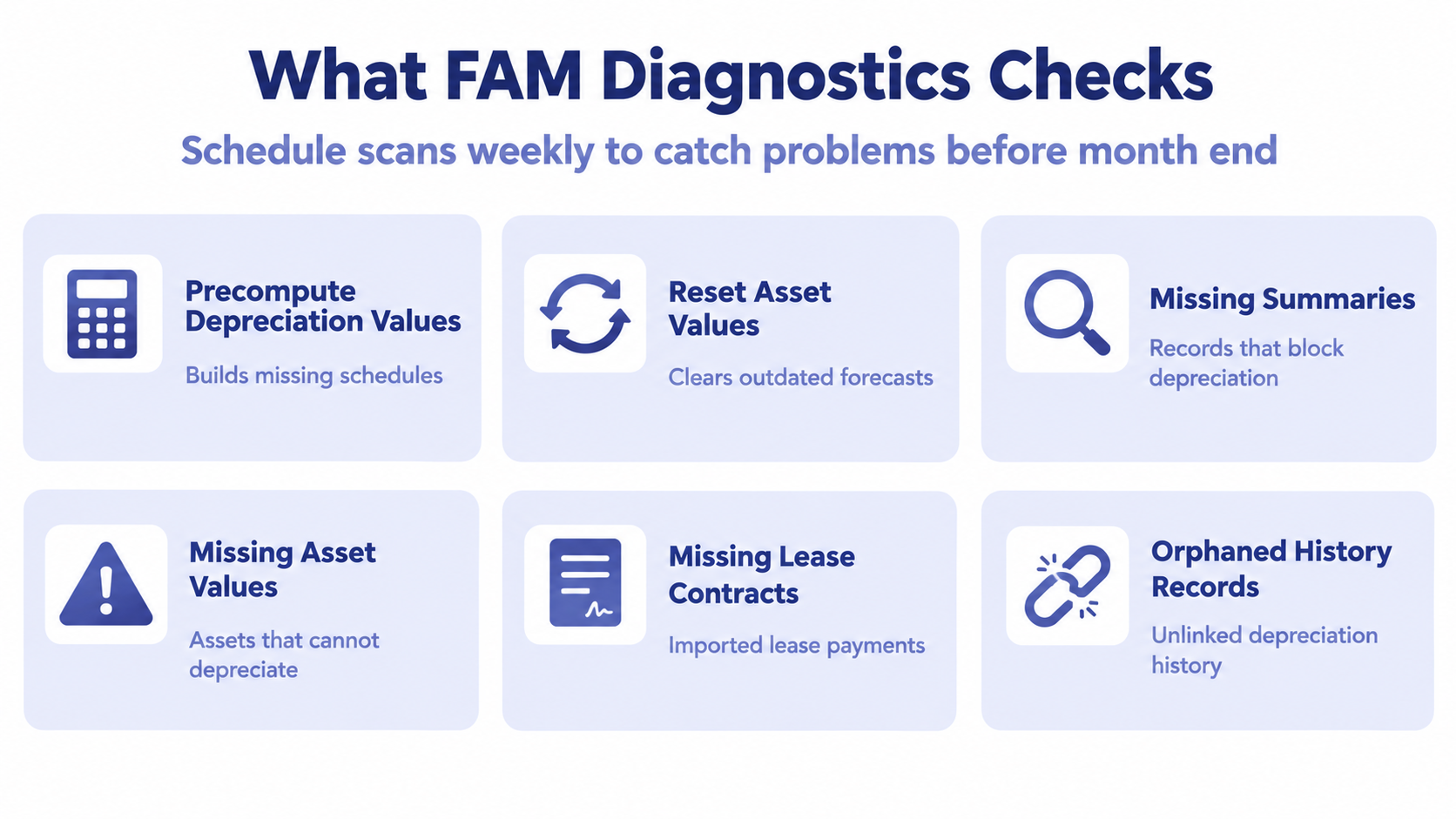
Run any check on demand with Run Scan, or schedule each one daily, weekly or monthly on the Diagnostics subtab of FAM System Setup. A weekly schedule catches most problems well before month end.
Spot Setup Problems Faster in Excel
After go-live, compare the GL balances of your fixed asset accounts against FAM reports every month. NetXcel, a free Excel and Google Sheets add-in for NetSuite, pulls the trial balance and balance sheet straight into a workbook, which makes it quick to spot an account that is moving when it should not be.
FAM Setup Checklist
- Asset and accumulated depreciation accounts created per asset class and flagged for FAM
- Depreciation expense, write-off, write-down and disposal accounts flagged
- Asset types created with method, life, residual percentage and accounts
- Asset transfer account records for every subsidiary pair that moves assets
- Preferences reviewed and decisions documented
- Server scripts on CSV import turned off; future-dated depreciation off
- Roles compared against the Fixed Assets Management role and updated
- Generic sale item with a gain or loss income account
- FAM Diagnostics portlet added and scans scheduled
Frequently Asked Questions
Do I need a separate asset account for every asset type?
No. Several asset types can share an account. Separate accounts per major class make reconciliation and financial statement presentation easier.
Can I change an asset type's accounts after assets exist?
Yes, but existing assets keep the accounts they were created with. You would need to update or transfer those assets as well.
Why are no asset proposals appearing?
Usually the purchase did not post to an account flagged as a fixed asset account, or Propose Approved Transactions Only is on and the bill is still pending approval.
Who should own FAM setup?
The controller or accounting manager should own the policy decisions; a NetSuite administrator or partner configures them. Both should sign off before go-live.
Get Your FAM Setup Right the First Time
We configure NetSuite Fixed Assets Management for single-entity and multi-subsidiary companies, from chart of accounts design and asset types to preferences, roles and diagnostics, and support it afterwards through managed services. Our free Fixed Assets Health Check reviews your setup and gives you a clear plan.